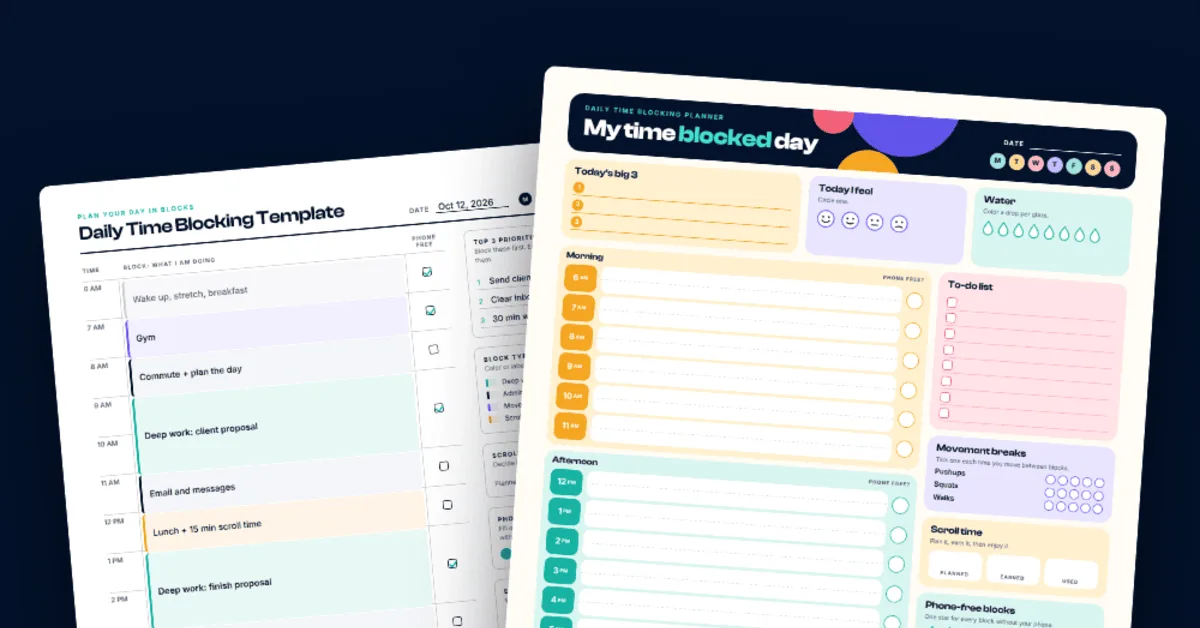
Download a free time blocking template as a printable PDF. Pick the minimal or colorful style, see a filled example and learn how to time block in 5 steps.
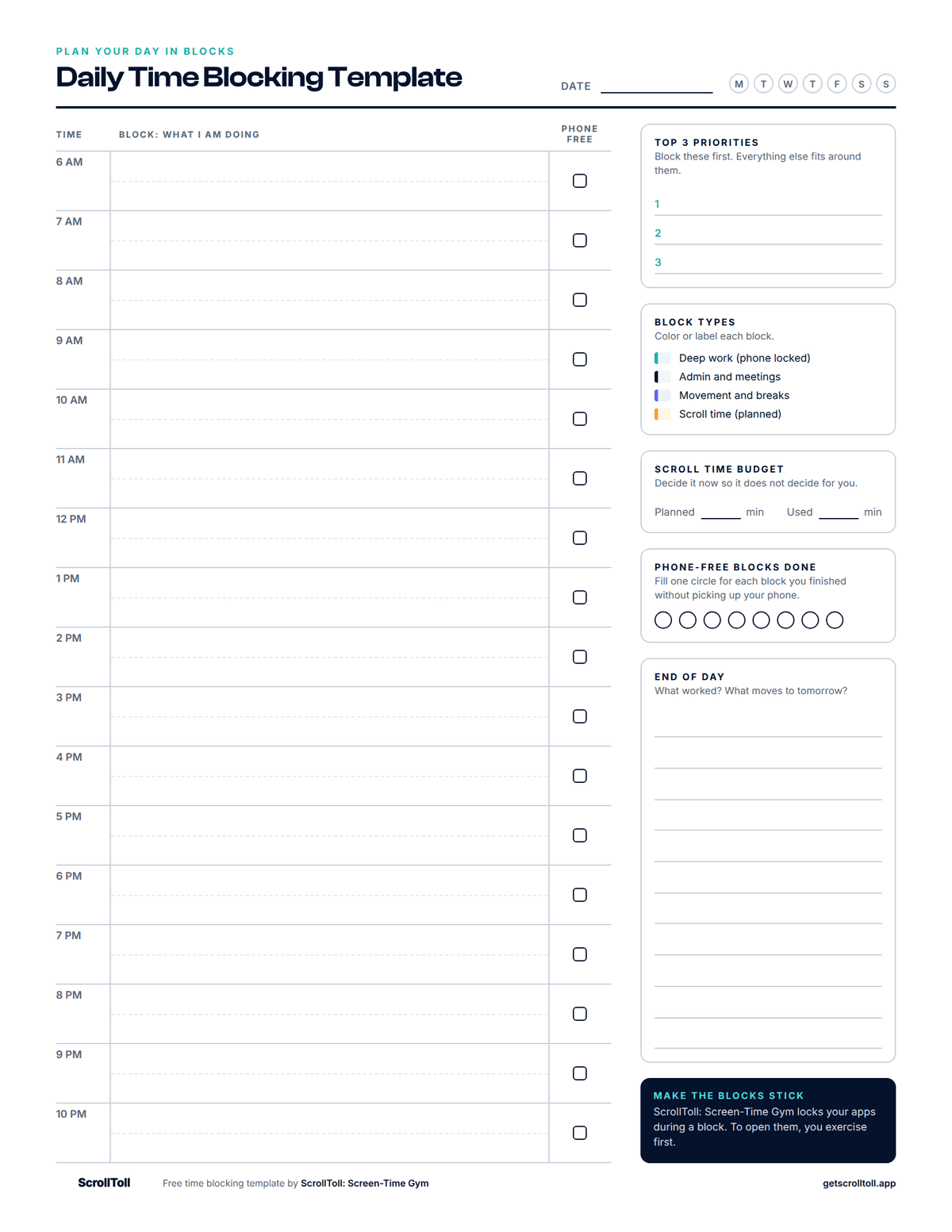
Quick answer: A time blocking template is a one-page daily planner that splits your day into hourly blocks, so every hour has a job before the day starts. This free template from ScrollToll: Screen-Time Gym comes as a printable PDF in two styles, minimal and colorful, in US Letter and A4. Both cover 6 AM to 10 PM and include your top 3 priorities, a scroll time budget and a phone-free check for every block.
Download the Free Time Blocking Template
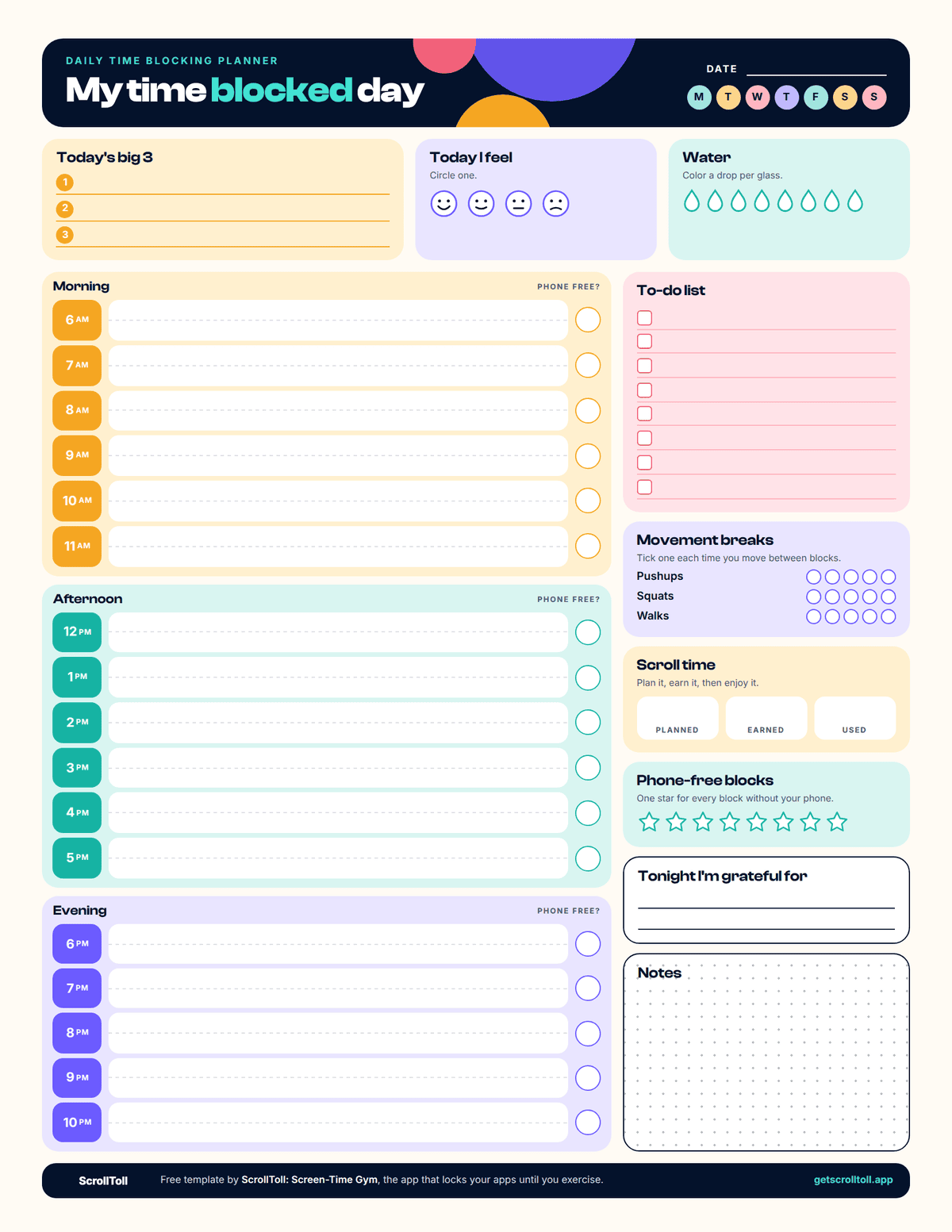
Pick the style you will actually enjoy filling in. Both are free, with no sign-up.
| Minimal | Colorful | |
|---|---|---|
| Best for | Work, study, printing in black and white | Home, school, planners and Pinterest boards |
| Schedule | 6 AM to 10 PM with half-hour lines | 6 AM to 10 PM, split into morning, afternoon and evening |
| Extras | Top 3 priorities, block types, end of day review | Big 3, to-do list, mood, water, movement breaks, gratitude, notes |
| Phone tools | Scroll time budget, phone-free checkboxes | Scroll time planned, earned and used, phone-free stars |
| Download | US Letter PDF · A4 PDF | US Letter PDF · A4 PDF |
Which template should you pick?
Answer these three questions. Two or more answers in one column tells you which to print.
| Question | Minimal | Colorful |
|---|---|---|
| Where will you use it? | At a desk or in a work binder | On the fridge, a wall or in a personal planner |
| What do you want to track? | Just time and priorities | Time plus habits like water, mood and movement |
| How do you feel about a busy page? | It distracts me | It motivates me |
What Is Time Blocking?
Time blocking is a way of planning your day where you give every block of time one specific job. Instead of working from a to-do list and hoping you get to everything, you decide in advance when each thing happens. 9 to 11 AM is the client proposal. 11 to 12 is email. 7 to 7:30 PM is scrolling.
The idea is simple: a task with a time attached gets done, and a task without one waits. The template turns that idea into something you can fill in with a pen in five minutes.
How to Use the Time Blocking Template in 5 Steps
- Write your top 3 first: These are the three things that would make today a good day. Everything else fits around them.
- Block your fixed things: Add what cannot move, like meetings, classes, the school run and meals.
- Give your top 3 the best hours: Put them where your energy is highest. For most people that is the morning. Give each one at least an hour.
- Batch the small stuff: Put email, messages and errands into one or two blocks, so they stop leaking into the whole day.
- Plan your scroll time: Write down when you will be on your phone and for how long. A planned 30 minutes feels better than a guilty two hours.
Then tick the phone-free box for every block you finish without picking up your phone. At the end of the day, write one line about what worked and what moves to tomorrow.
Time Blocking Example: A Filled-In Day
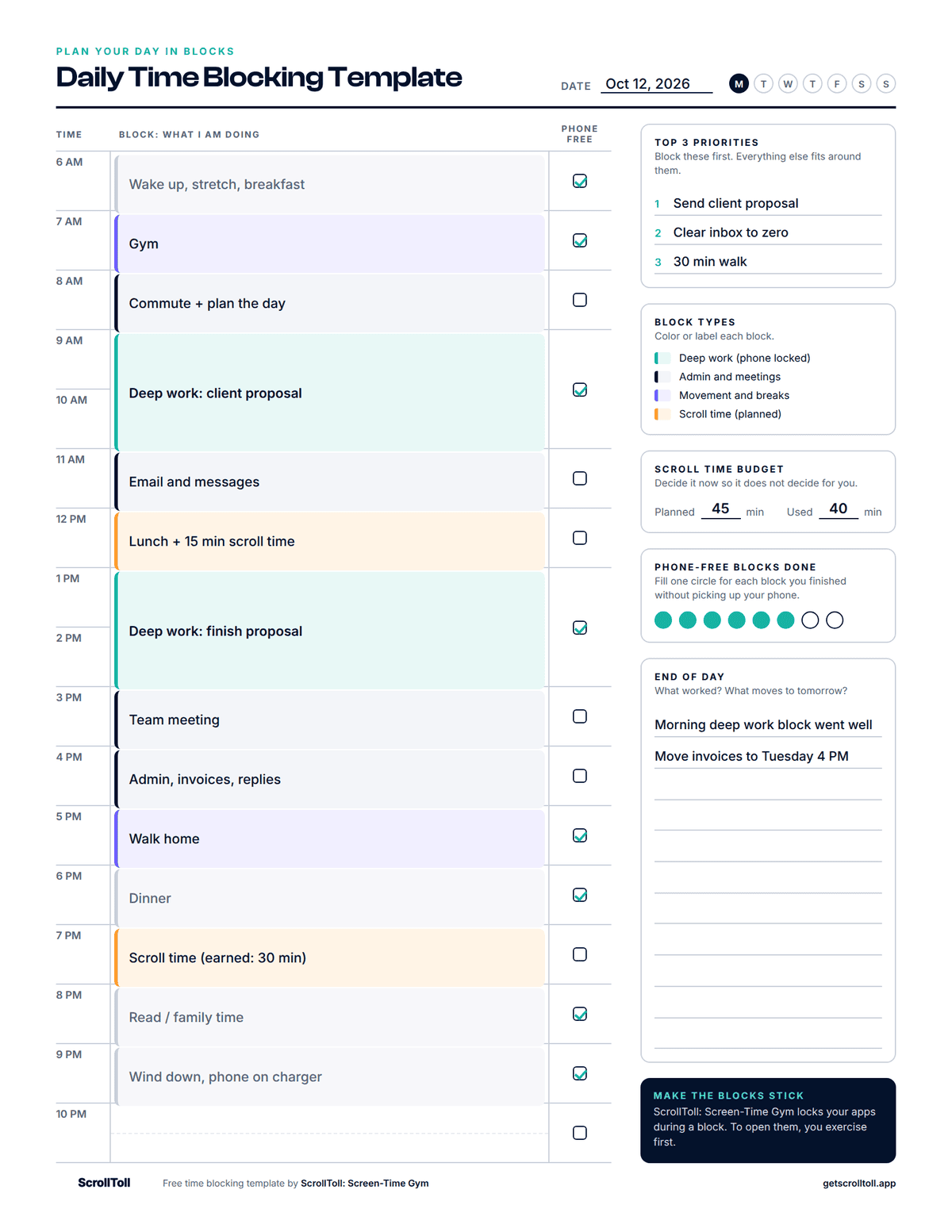
Here is the minimal template filled in for a normal workday.
| Time | Block | Phone free |
|---|---|---|
| 6 to 7 AM | Wake up, stretch, breakfast | Yes |
| 7 to 8 AM | Gym | Yes |
| 8 to 9 AM | Commute and plan the day | No |
| 9 to 11 AM | Deep work: client proposal | Yes |
| 11 AM to 12 PM | Email and messages | No |
| 12 to 1 PM | Lunch and 15 minutes of scroll time | No |
| 1 to 3 PM | Deep work: finish proposal | Yes |
| 3 to 5 PM | Team meeting, then admin | No |
| 5 to 7 PM | Walk home, dinner | Yes |
| 7 to 8 PM | Scroll time | No |
| 8 to 10 PM | Reading, family time, wind down | Yes |
Notice three things. The hardest work sits in the morning. Email has its own block, so it does not interrupt the proposal. And scrolling is on the plan, which is what stops it from spreading everywhere else.
Should You Use 15, 30 or 60 Minute Blocks?
Start with 60 minute blocks. They are forgiving, and most real tasks take longer than you expect.
- 60 minutes: best for beginners and for deep work. This is what the template uses.
- 30 minutes: good for busy days full of short tasks. Use the half-hour line in each row of the minimal template.
- 15 minutes: only worth it if your day is packed with calls or appointments. For most people it turns planning into a job of its own.
A useful rule: if you keep running over, your blocks are too small.
Why Time Blocking Works
- It removes the "what now?" moments: Every time you finish a task and have to decide what comes next, you lose time and often reach for your phone. A blocked day has already made that decision.
- It protects focus: Author and computer science professor Cal Newport, who made the method popular, estimates that a 40 hour time-blocked work week produces the same output as a 60 hour week without structure. That is his own estimate and not a study, but it matches what most people notice in the first week.
- It cuts the cost of interruptions: In a well-known experiment, researchers at the University of California, Irvine found that people who were interrupted finished their tasks faster but reported more stress, frustration and time pressure. Batching messages into one block means fewer interruptions in all the others.
Time blocking is not magic. Days go off plan, and that is normal. When it happens, cross out the rest of the day and re-block what is left. A plan you adjust is still better than no plan.
The Real Reason Time Blocks Fail: Your Phone
You can plan a perfect 9 to 11 AM deep work block. Then at 9:20 you check one notification, and at 9:50 you are still scrolling. The template did not fail. The block had nothing guarding it.
This is the problem ScrollToll: Screen-Time Gym is built to solve. It locks the apps that pull you out of a block, like TikTok, Instagram and YouTube. To open them, you exercise first. Your phone's camera counts your pushups, squats or jumping jacks, and each rep earns you screen time. Nothing from the camera is recorded or uploaded.
That small bit of effort is the point. A 2023 study in PNAS found that adding a short delay before an app opens led people to open it 57% less often after six weeks. Ten squats is a longer pause than that, and it gets you moving between blocks.
It also fits the template. The "scroll time" box has a line for minutes earned, and the colorful version has a movement breaks tracker for pushups, squats and walks. Paper plans the day, and ScrollToll makes the phone-free blocks stick.
ScrollToll works on iPhone and Android. See the pricing page for plans, or read how an app blocker that needs exercise to unlock works.
Not sure how much time your phone takes? Try the ScrollToll Screen Time Calculator. Enter your daily hours and see what they add up to over a year and a lifetime. It is a good number to have in mind when you set your scroll time budget.
5 Time Blocking Mistakes to Avoid
- Blocking every minute: Leave one empty block a day for things that run over.
- No breaks: Put a short movement break between long blocks. You will focus better in the next one.
- Too many priorities: Three is the limit. If everything is a priority, nothing is.
- Planning in the morning rush: Fill in tomorrow's template the evening before. It takes five minutes and you start the day already knowing what to do.
- Quitting after one bad day: Give it five days before you judge it. The first two are always messy.
Try It Today: The 10 Minute Start
You do not need a perfect system. Do this now:
- Download and print one template
- Write your top 3 for tomorrow
- Block one 60 minute phone-free session for the most important one
- Write down your scroll time budget
- Put the page where you will see it in the morning
For more ways to protect your focus, read our guides on how to focus, how screen time is killing your productivity and the best productivity apps. Students can start with how to focus on homework without phone distractions.
Frequently Asked Questions
What is time blocking?
Time blocking is a planning method where you divide your day into blocks of time and give each block one specific task. Instead of working from an open to-do list, you decide in advance when each thing will happen. Most people use blocks of 30 to 60 minutes and plan the day the evening before.
How do you time block your day?
Start by writing down your three most important tasks. Add the fixed parts of your day, such as meetings and meals, then place your important tasks in the hours when you have the most energy. Group small jobs like email into one or two blocks, and leave one block empty for anything that runs over.
Is there a free printable time blocking template?
Yes. ScrollToll: Screen-Time Gym offers a free printable time blocking template as a PDF in two styles, minimal and colorful. Both come in US Letter and A4, cover 6 AM to 10 PM and include a top 3 priorities section, a scroll time budget and a phone-free check for each block.
Does time blocking work?
Time blocking works for most people because it removes the need to decide what to do next and protects time for important work. It works best when you keep your blocks realistic and leave some empty space in the day. It tends to fail when phone notifications keep interrupting the blocks, so many people pair it with an app blocker.
What are the benefits of time blocking?
The main benefits are better focus, less time lost switching between tasks and a clearer picture of where your day goes. It also makes it easier to say no, because you can see that your day is already full. Many people find it lowers stress, since tasks have a set time and stop sitting in the back of the mind.
What is an example of time blocking?
A simple example is a workday where 9 to 11 AM is deep work on one project, 11 AM to 12 PM is email, 12 to 1 PM is lunch, 1 to 3 PM is a second deep work block and 3 to 5 PM is meetings and admin. Each block has one job, and small tasks are grouped together so they do not interrupt focused work.
Should I use 15 minute or 30 minute time blocks?
Most people do best with 30 or 60 minute blocks. Blocks of 15 minutes only make sense if your day is full of short calls or appointments, because planning that tightly takes effort and breaks easily. If you often run over, make your blocks longer.
Does time blocking work for ADHD?
Many people with ADHD find time blocking helpful because it makes time visible and removes the need to decide what to do next. It usually works better with shorter blocks, movement breaks between them and extra buffer time. Everyone is different, so it is worth trying for a week and adjusting, and a doctor or ADHD coach can give advice that fits your situation.
What are the alternatives to time blocking?
Common alternatives are the Pomodoro technique, which uses 25 minute work sessions with short breaks, task batching, where you group similar tasks, and a simple daily top 3 list. Some people combine them, for example by running Pomodoro sessions inside a longer time block. The best method is the one you will keep using.
How does ScrollToll help with time blocking?
ScrollToll: Screen-Time Gym locks distracting apps like TikTok, Instagram and YouTube, and you unlock them by doing exercises such as pushups or squats. This protects your focus blocks, because opening a locked app takes real effort. It also gives you a short movement break before your planned scroll time.
Ready to break the loop?
Download ScrollToll and start earning your screen time through real movement.