The best productivity apps in 2026, matched to real problems: distraction, planning, focus, and follow-through. See where ScrollToll fits and how to pick.
There is no single best productivity app. There is only the right app for the thing that is actually slowing you down. Here is how the tools people use most in 2026 map onto real problems, and where ScrollToll fits.
The Short Answer
Most "best productivity app" lists hand you a leaderboard and wish you luck. That is the wrong shape. An app is not good or bad on its own. It is good or bad for a specific problem. So instead of ranking apps, we matched the tools people lean on most in 2026 to the six problems that quietly wreck a productive day. Find your problem, then pick the tool.
The 2026 Lineup at a Glance
These are the apps we reference throughout, grouped by the job they do in your stack. ScrollToll sits at the top because it protects the one thing every other tool depends on: your attention.
| App | Role in your stack | Best for | Watch out if… | Pricing |
|---|---|---|---|---|
| ScrollTollStart here | Attention protection through physical friction | Anyone whose phone steals focus before work even starts | Your distractions live entirely off your phone | Free tier; Premium from $2.29/mo |
| one sec | Gentle pause before you open an app | Autopilot reaching; ADHD-style impulse opens | You need a hard block, not a breath | Free; Pro subscription |
| Freedom | Cross-device blocking (phone + laptop) | People who "device-switch" to dodge a block | You only ever get distracted on one device | Free trial; paid from ~$9/mo |
| Todoist | Fast task capture and organization | Emptying a cluttered head quickly | You want an all-in-one workspace with docs | Free; Pro ~$7/mo |
| Motion | AI auto-scheduling onto your calendar | Packed calendars with many hard-deadline tasks | You want a cheap or free planner | From ~$19/user/mo (no free plan) |
| Sunsama | Calm, manual daily planning ritual | Choosing a realistic day, not a long list | You want ultra-light or free | ~$20/mo on annual billing |
| Toggl Track | Time tracking and reality-check reporting | Seeing where hours actually go | You want one giant project suite | Free up to 5 users; paid from ~$9 |
| Notion | Docs, notes, and a shared knowledge hub | Operational notes and team reference | You over-build systems instead of working | Free; paid from ~$10/user/mo |
| Obsidian | A personal second brain of linked notes | Writers, researchers, long-term thinkers | You need polished team collaboration | Free for personal use |
Pricing moves often and varies by region and platform. Treat the figures above as a rough guide and check each app's own site before you buy.
Problem 01 — "I know what I need to do, but I keep getting pulled away from it."
When the problem is temptation rather than unclear priorities, a blocker earns its place. This is where ScrollToll, Freedom, and one sec come in, each with a different amount of friction.
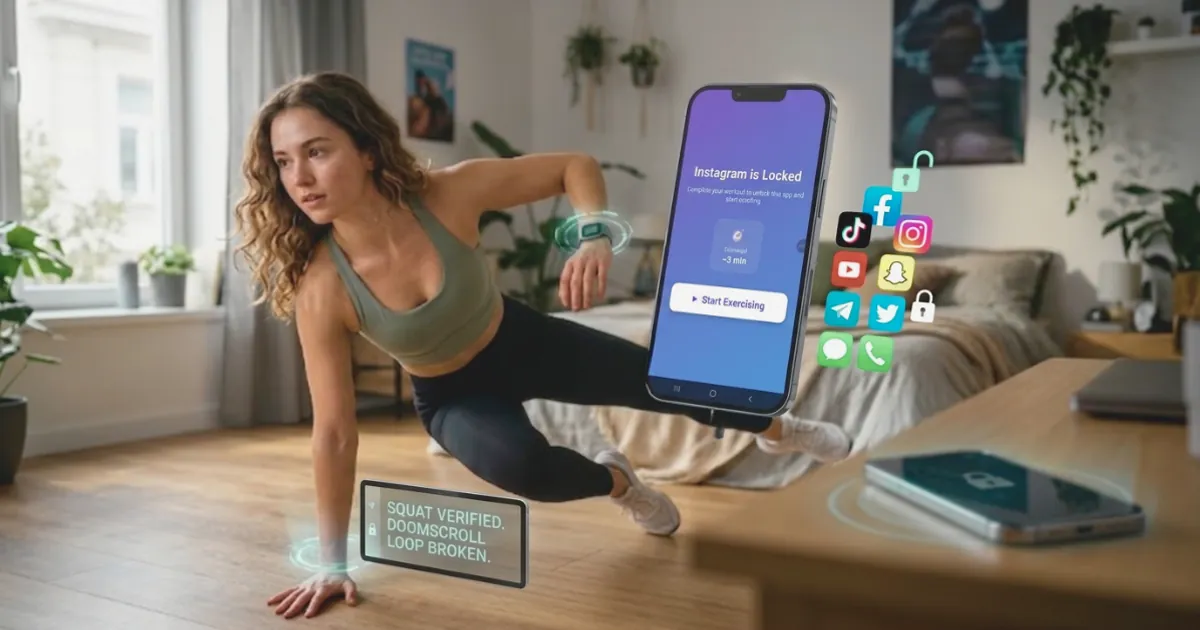
The gap most blockers leave is that they are easy to dismiss. A timer you can swipe past does not change behavior. ScrollToll closes that gap by making your body the password: when a locked app runs out of earned time, you do a set of AI-verified pushups, squats, or steps to unlock more. The camera checks your form on-device, so you cannot fake your way back to the feed. A student blocks TikTok during a 90-minute revision block; a remote worker earns their evening scroll with a few squats instead of losing an hour on autopilot. The friction is the point, and unlike a plain timer, it leaves you a little fitter each time.
Problem 02 — "My head is full of unfinished tasks."
A task manager is not exciting, but it gives your brain somewhere to put things so it can stop rehearsing them. Todoist, TickTick, and Microsoft To Do shine when the real issue is mental clutter: follow-ups, invoices, messages, and half-finished admin all competing for the same working memory.
The move is simple: dump every request, deadline, and loose end into one trusted list instead of carrying it around. A freelancer stops losing follow-ups; a manager keeps one-to-ones and approvals visible between meetings. The app is less a planner than a pressure-release valve.
Problem 03 — "My to-do list looks fine, but it never fits into a real day."
This is the fastest-moving corner of 2026, because AI planners now do the time-blocking for you. Motion is the headline tool: you give it tasks, deadlines, and durations, and it auto-schedules everything onto your calendar, then reshuffles in real time when a meeting appears or a task slips. It is genuinely useful if your week has 20+ hours of meetings and a pile of hard deadlines, though there is no free plan and it can feel like overkill for a light week.
If you would rather stay in control, Sunsama keeps planning manual but calm: it walks you through choosing a realistic handful of tasks each morning and pulls them in from Todoist or Notion. Either way, the value is the same. The plan forces a trade-off, so you see what does not fit before the day proves it to you.
Problem 04 — "I work all day, but I can't tell where my time went."
When the week feels full but the output feels thin, the problem is visibility, not effort. Toggl Track, Clockify, and Rize help you see the truth: that client communication ate twice its budget, or that reactive tasks swallowed the first two hours every morning.
Use tracking diagnostically, not obsessively. You do not need to measure every minute forever. One honest week usually surfaces patterns you would never catch from memory alone.
Problem 05 — "I save a lot of information, but I rarely use it later."
Notes tools only help when your work depends on ideas, references, and material you revisit. The split is simple. Notion is operational: briefs, docs, onboarding, and shared workflows in one workspace, great for teams and solo creators running a system. Obsidian is reflective, a personal web of linked notes for writers, researchers, and anyone building understanding over time.
The rule of thumb: if your notes exist to support work in motion, lean Notion. If they exist to help you think and connect ideas, lean Obsidian. The one trap to avoid is spending more time building the system than doing the work.
Problem 06 — "I struggle to get into a focused state, even when I'm ready."
When the task is clear and distractions are handled but the transition into work still feels slow, small support tools help. Brain.fm gives focus-specific audio to settle into a rhythm; Forest makes a study block concrete by growing a tree while you stay off your phone.
ScrollToll also belongs here, from the other direction. A short set of reps is a physical ritual that marks the boundary between "off" and "on". You move, your body wakes up, and you drop into the work instead of drifting toward a feed. These tools are not foundational, but starting cleanly is half the battle in knowledge work. For the habits behind that transition, see our guide on how to focus.
Keep Reading
- How ScrollToll works: the three-step loop that turns movement into screen time.
- Exercises you can choose from: pushups, squats, lunges, walking, memory tiles, and more.
- More from the ScrollToll blog: guides on focus, screen time, and healthier phone habits.
- About ScrollToll: why we built a screen-time app you earn with your body.
Sources
- Microsoft. (2025). Work Trend Index 2025. microsoft.com
- Asana. Why work about work is bad for productivity. asana.com
- University College London. (2025). Task planning and optimistic bias in knowledge work. discovery.ucl.ac.uk
- RescueTime. The State of Work Life Balance. blog.rescuetime.com
- APQC. Content management: improving knowledge sharing and reuse. apqc.org
- University of California, Irvine. Brain-based tips for sharpening your focus (Gloria Mark cited). informatics.uci.edu
Frequently Asked Questions
How do I stay productive at work?
Protect your attention before you optimize anything else. Most lost productivity at work comes from constant micro-interruptions, not bad planning. Block your most distracting apps during deep-work blocks with a tool like ScrollToll, capture every task in one list so nothing lives rent-free in your head, and plan a realistic number of tasks per day instead of an endless list.
How do I stay productive all day without burning out?
Work in focused blocks with real breaks between them rather than grinding straight through. Guard your deep-work windows with a blocker, and make the breaks genuine recovery, movement or rest, not a switch to another feed. ScrollToll turns each break into a short exercise, so you step away from the screen instead of trading one scroll for another.
How do I stay productive working remotely or from home?
Remote work removes the built-in friction of an office, so you have to supply your own. Set fixed work hours, block social apps during those hours, and build a clear start-and-stop ritual for the day. A strict app blocker matters more at home precisely because no one is around to keep you honest.
How do I stay productive during summer or on low-energy days?
Shorten the workday and defend the good hours instead of spreading effort thinly across a long, distracted one. Pick two or three real priorities, block distractions during a focused morning window, and let the rest of the day be lighter. A little movement between blocks helps energy far more than another coffee-and-scroll.
How do I stay productive when I'm feeling low or unmotivated?
Lower the bar and remove friction. Choose one small task, make starting almost effortless, and cut off the endless-scroll escape hatch that low motivation reaches for. Light movement genuinely helps lift energy and mood. If low mood is persistent or heavy, treat it as a wellbeing issue worth talking to a doctor or someone you trust about, not just a productivity problem to hack.
Should I fix my focus or my organization first?
Fix focus first if you already know what to do but keep getting pulled away. Fix organization first if you stay focused but feel overwhelmed by everything you are trying to remember. For most people the order is: protect attention, capture tasks, plan realistically, then refine the rest.
Is ScrollToll only for people with severe phone addiction?
No. It helps just as much with the small, undramatic focus leaks, the reflexive "quick check" that turns into twenty minutes. Because unlocking costs a few reps, the impulse often dies before it starts, whether your habit is heavy or just persistent.
Are free productivity apps enough?
Often, yes. ScrollToll, Todoist, Notion, and Toggl Track all have free tiers that cover most people well. Paid plans start to earn their price when you need stronger limits, deeper reporting, AI scheduling, or team collaboration.
Ready to break the loop?
Download ScrollToll and start earning your screen time through real movement.